Quickstart
Spirit of the project
The idea of the package is to provide a simple way to store and retrieve data relevant to Brillouin Light Scattering experiments together with the metadata associated to the data. The file we propose to use is the HDF5 file format (standing for “Hierarchical Data Format version 5”). The idea of this project is to use this file format to reproduce the structure of a filesystem within a single file, storing all files corresponding to a given expoeriment in a single “group”. For example, a typical structure of the HDF5 file could be:
file.h5
└── Brillouin
    ├── Measure of water
    │   ├── Image of the power spectral density
    │   ├── Channels associated to the power spectral density
    │   ├── Results after data processing
    │   │   ├── Shift
    │   │   ├── Shift variance
    │   │   ├── Linewidth
    │   │   ├── Linewidth variance
    │   │   ├── Amplitude
    │   │   ├── Amplitude variance
    │   │   ├── ...
    ├── Measure of methanol
    │   ├── ...
To allow this file format to be used with other modalities (e.g. electrophoresis assays to complement a Brillouin experiment), we propose to use a top-level group corresponding a minima to the modality (e.g. “Brillouin”). We also propose to add to each element of the HDF5 file, a “Brillouin_type” attribute that will allow to know the type of the element. For datasets, these types are:
Raw_data: the raw data
PSD: a power spectral density array
Frequency: a frequency array associated to the power spectral density
Abscissa_x: an abscissa array for the measures where the name is written after the underscore.
Shift: the shift array obtained after the treatment
Shift_err: the array of errors on the shift array obtained after the treatment
Linewidth: the linewidth array obtained after the treatment
Linewidth_err: the array of errors on the linewidth array obtained after the treatment
Amplitude: the amplitude array obtained after the treatment
Amplitude_err: the array of errors on the amplitude array obtained after the treatment
BLT: the Loss Tangent array obtained after the treatment
BLT_err: the array of errors on the Loss Tangent array obtained after the treatment
For groups, these types are:
Calibration_spectrum: the calibration spectrum
Impulse_response: the impulse response
Measure: the measure
Root: the root group
Treatment: the treatment
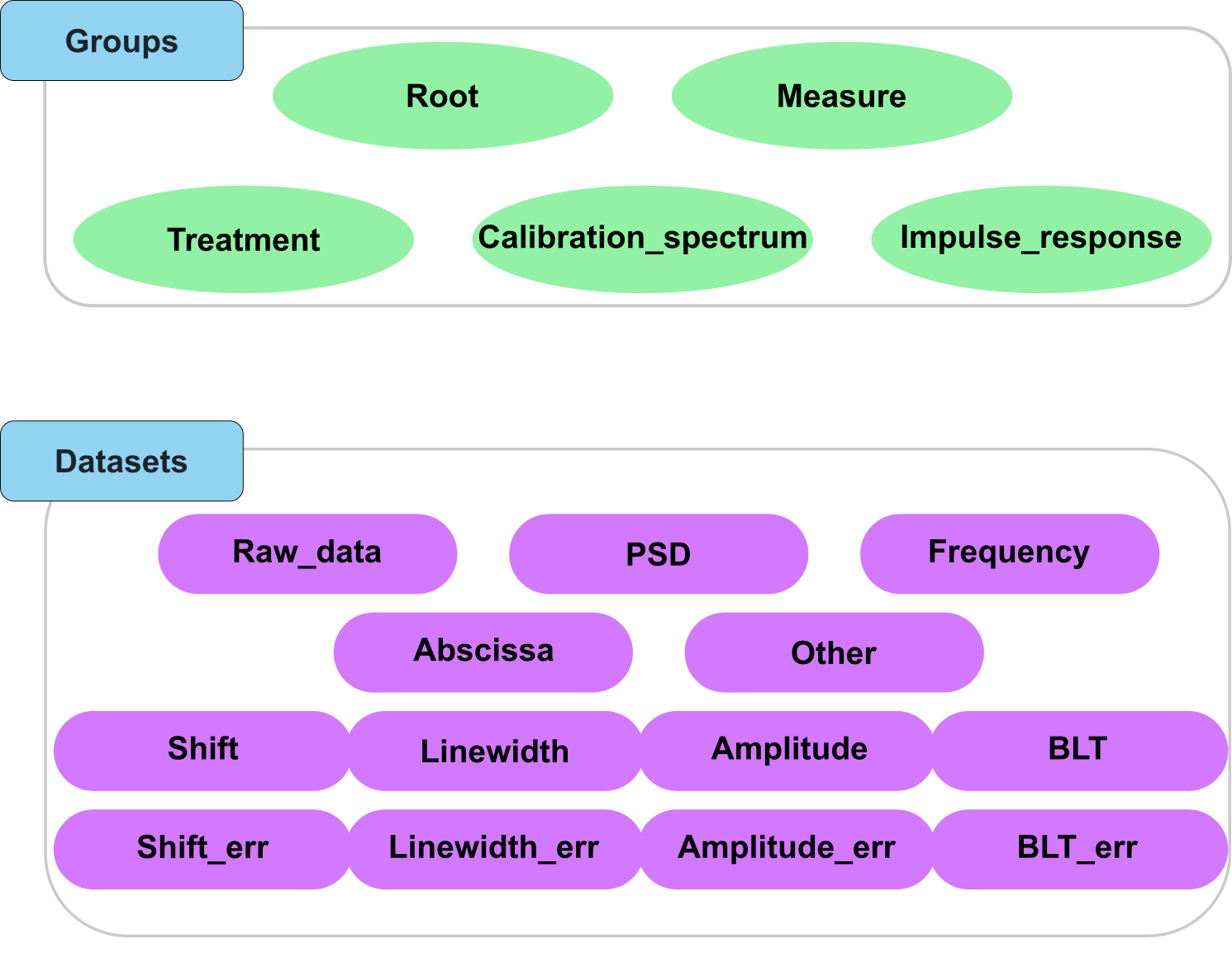
Fig. 3 A visual representation of the Brillouin_type attribute for groups and datasets in the HDF5 file.
Installation
To install the package, you can use pip:
pip install HDF5_BLS
Usage
Integration to workflow
Once the package is installed, you can use it in your Python scripts as follows:
import HDF5_BLS as bls

# Create a HDF5 file
wrp = bls.Wrapper(filepath = "path/to/file.h5")

###############################################################################
# Existing code to extract data from a file
###############################################################################
# Storing the data in the HDF5 file (for this example we use a random array)
data = np.random.random((50, 50, 512))
wrp.add_raw_data(data = data, parent_group = "Brillouin/Measure", name = "Raw data")

###############################################################################
# Existing code to convert the data to a PSD
###############################################################################
# Storing the Power Spectral Density in the HDF5 file together with the associated frequency array (for this example we use random arrays)
PSD = np.random.random((50, 50, 512))
frequency = np.arange(512)
wrp.add_PSD(data = PSD, parent_group = "Brillouin/Measure", name = "Power Spectral Density")
wrp.add_frequency(data = frequency, parent_group = "Brillouin/Measure", name = "Frequency")

###############################################################################
# Existing code to fit the PSD to extract shift and linewidth arrays
###############################################################################
# Storing the Power Spectral Density in the HDF5 file together with the associated frequency array (for this example we use random arrays)
shift = np.random.random((50, 50))
linewidth = np.random.random((50, 50))
wrp.add_treated_data(parent_group = "Brillouin/Measure", name_group = "Treat_0", shift = shift, linewidth = linewidth)

###############################################################################
# Other methods to add data to the HDF5 file
###############################################################################
# If you want to add an abscissa array, you can use the following command where you specify which dimensions the abscissa array applies to
wrp.add_abscissa(data, "Brillouin/Measure", name="Time", unit = "min", dim_start = 0, dim_end = 1, overwrite = False)
# If you want to add a particular attribute, you can use the following command
wrp.add_attributes({"an attribute": "its value"}, parent_group="Brillouin/Measure", overwrite=True)
# If you want to add any other dataset, you can use the following command
wrp.add_other(data, "Brillouin/Measure", name="Other", overwrite=True)
To summarize this example, we first create a HDF5 file. Then we add our data to it, placing it under a group named “Measure”. Datasets are added based on their nature, with an associated function. Here we add a PSD, a frequency array, a shift and linewidth array and then an abscissa and another dataset. Here are the liste of functions to use depending on the type of data:
Raw data (data straight from the spectrometer): add_raw_data
PSD (a Power Spectral Density array): add_PSD
Frequency (a frequency array associated to the power spectral density): add_frequency
Abscissa (an abscissa array for the measures where the name is written after the underscore): add_abscissa
Shift, Linewidth, or any other type of results: add_treated_data
Other (the other data): add_other
We can then extract the data from the HDF5 file using the wrapper object. The wrapper object is initialized by running the following command:
wrp = Wrapper()
Extracting the data from the HDF5 file
Once the data is stored in the HDF5 file, you can extract it as follows:
import HDF5_BLS as bls

# Open the file
wrp = bls.Wrapper(filepath = "path/to/file.h5")

# Extract the data
data = wrp["Brillouin/path/in/file/Raw data"]
To get the path leading to a dataset, you can either use existing software to browse the file (we recommend Panoply and myHDF5), or you can use the HDF5_BLS package to display the structure of the file:
print(wrp)
Importing external data
The module comes with a centralized import module (HDF5_BLS.load_formats) that is meant to streamline the import of data from external files. This module has been wrapped in the Wrapper object and can be accessed with dedicated commands, depending on the nature of the file you want to import:
wrp.import_raw_data(filepath, parent_group = "Brillouin", name = 'Name of the dataset', creator = None, parameters = None, reshape = None, overwrite = False)
wrp.import_PSD(filepath, parent_group = "Brillouin", name = 'Name of the dataset', creator = None, parameters = None, reshape = None, overwrite = False)
wrp.import_other(filepath, parent_group = "Brillouin", name = 'Name of the dataset', creator = None, parameters = None, reshape = None, overwrite = False)
wrp.import_properties_data(filepath, path = None, overwrite = False, delete_child_attributes = False)
The ‘creator’ parameter is used to identify the software or method used to generate the data. The creator is a string that is attached to a file extension. Here is a table of the creators and their associated file extensions:
Extension |
Denomination |
Description |
|---|---|---|
.dat |
“GHOST” |
Files obtained with the GHOST interface (software driving the TableStable JRS-TFP1 and TFP2 spectrometers) |
.dat |
“TimeDomain” |
Files obtained with the Time Domain setup located at the University of Nottingham |
.npy |
None |
Numpy files (no creator needed) |
.sif |
None |
SIF files obtained with Andor cameras in custom-built spectrometers (no creator needed) |
All image formats supported by Pillow |
None |
Image files (no creator needed) |
As the project grows, we expect more file extensions to be added to this table.
Note
The import of HDF5 files is handled by a specific logic, which is explained in the section add merge. The import of Brim files is handled by a specific module, ‘BrimConverter’.